Skip to content
  • About Us
  • Account
  • Cart
  • Checkout
  • Contact Us
  • Create New Ticket
  • Feature Request
  • Forum
  • Front page
  • Learn
  • Legal Notice / Impressum
  • My account
  • Newsletter
  • Privacy policy / Datenschutzerklärung
  • Products
  • Refund & Download Policy / Rückerstattungs- und Download-Richtlinie
  • Support
  • Terms and Conditions / Allgemeine Geschäftsbedingungen (AGB)
  • Thank you for your order
Softtouch Software Design

Turning Ideas Into Digital Solutions

  • Products
  • Support & Community
    • Support Ticket
    • Forum
    • Feature Request
    • Newsletter
  • About Us
  • Contact Us
  • My account
  • Cart
Softtouch Software Design

Turning Ideas Into Digital Solutions

YouTube Scraper V3.0.0.1

7
  • 1. Introduction
  • 2. Getting Started
  • 3. Main Window Overview
  • 4. Importing YouTube URLs
  • 5. Retrieving Video Information
  • 6. Managing Videos
  • 7. Downloading Videos
View Categories
  • Home
  • Docs
  • YouTube Scraper V3.0.0.1
  • 2. Getting Started

2. Getting Started

1 min read

0:00 / 1:18
  • View as Markdown Open this page as plain Markdown (opens in a new tab)
  • Open in ChatGPT Ask questions about this page (opens in a new tab)
  • Open in Claude Ask questions about this page (opens in a new tab)
  • Open in Google AI Studio Ask questions about this page (Google account required) (opens in a new tab)

System Requirements #

YouTube Scraper is a Windows desktop application. Before using it, make sure you have a supported Windows environment and an active internet connection.

An internet connection is required to download the necessary components and to retrieve information or download media from YouTube.

First Launch #

Start YouTube Scraper using its desktop shortcut or executable file.

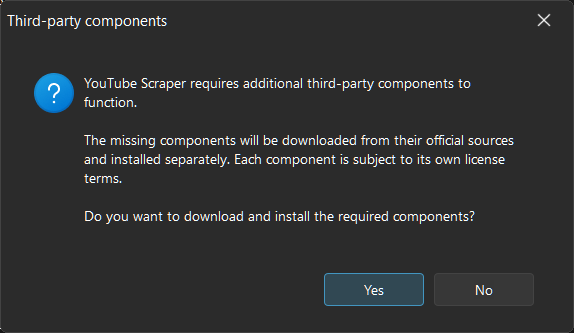
During startup, the application automatically checks whether all required components are available. If one or more components are missing, YouTube Scraper asks for your confirmation before downloading them.

You do not need to search for or install these components manually.

Downloading the Required Components #

After you confirm the download, YouTube Scraper automatically downloads all missing components.

The application uses the following components:

  • yt-dlp – Handles YouTube video information retrieval and media downloads.
  • Deno – Provides the JavaScript runtime required by yt-dlp for certain operations.
  • libVLC – Provides media playback functionality.
  • MediaInfo – Reads technical information from media files.
  • Chromaprint (fpcalc) – Generates acoustic fingerprints from audio files.

Only components that are missing are downloaded. Components that are already available do not need to be downloaded again.

Depending on your internet connection and the size of the downloads, the process may take a few moments.

Ready to Use #

Once all required components are available and initialized, YouTube Scraper is ready to use.

You can now proceed to the next chapter to learn about the main application window and its available functions.

Updated on November 2, 2026

What are your Feelings

  • Happy
  • Normal
  • Sad

Share This Article :

  • Facebook
  • X
  • LinkedIn
  • Pinterest
1. Introduction3. Main Window Overview
Table of Contents
  • System Requirements
    • First Launch
    • Downloading the Required Components
    • Ready to Use
  • Terms and Conditions / AGB
  • Privacy policy / Datenschutzerklärung
  • Refund Policy / Widerruf
  • Legal Notice / Impressum

Copyright © 2026 - Guenter Kraemer | Softtouch Software Design

Loading...

Insert/edit link

Enter the destination URL

Or link to existing content

    No search term specified. Showing recent items. Search or use up and down arrow keys to select an item.