Google Maps Scraper
Automatically collect business data from Google Maps
The Google Maps Scraper is a Windows application that automates the process of searching Google Maps and collecting business information.
Instead of manually searching for businesses, opening individual listings, and copying their information one by one, you can enter your desired business types and locations and let the scraper perform the searches automatically.
Whether you are researching local businesses, building a business database, looking for potential leads, or analyzing a particular market, the Google Maps Scraper helps you collect the information you need quickly and efficiently.
Search multiple business types and locations
The scraper allows you to create separate lists of business types and locations.
For example, you could enter:
Business Types
- Dentists
- Chiropractors
- Physiotherapists
- Medical Centers
Locations
- Cologne
- Düsseldorf
- Bonn
The scraper automatically combines the business types and locations and searches Google Maps for each combination.
This makes it easy to run large scraping jobs without having to manually perform every search.
Collect detailed business information
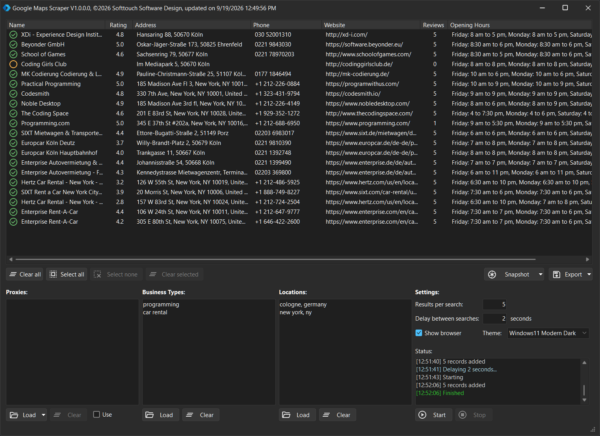
For each business found, the scraper can collect a range of information available from its Google Maps listing, including:
- Business name
- Google Maps URL
- Rating
- Number of reviews
- Address
- Phone number
- Website
- Opening hours
- Claimed status
- Customer reviews
All collected information is organized inside the application, making it easy to review your results before exporting them.
Collect Google Maps reviews
The scraper can also collect customer reviews from business listings.
Reviews are stored separately from the main business information, allowing them to be analyzed or processed independently. This can be useful for researching customer opinions, identifying frequently mentioned topics, or analyzing feedback across different businesses.
Search thousands of businesses automatically
When you need to research many businesses, manually searching Google Maps can become a repetitive and time-consuming task.
The Google Maps Scraper is designed to automate this process. You can define how many results you want to collect for each search and configure a delay between searches.
Once started, the scraper works through your business type and location combinations automatically.
Proxy support
The Google Maps Scraper supports proxy servers and allows you to import your proxy list directly into the application.
Simply load your proxies and enable Use Proxies when required.
Proxy support can be useful when running larger scraping jobs or when you want to distribute requests across different proxy addresses.
Monitor the scraping process
The optional Show Browser feature allows you to see the Google Maps browser while the scraper is working.
This feature is primarily intended for debugging and monitoring. The displayed browser cannot be interacted with, so the automated scraping process cannot accidentally be interrupted by mouse or keyboard input.
Easy to use
The scraper is designed around a simple workflow:
1. Enter your business types
Add the types of businesses you want to find, with one business type per line.
2. Enter your locations
Add the locations you want to search, with one location per line.
3. Configure your settings
Choose the number of results to collect per search and configure the delay between searches.
You can also load and enable proxies if required.
4. Start scraping
Start the scraper and let it work through your configured business type and location combinations.
5. Review your results
Browse the collected businesses and their available information directly in the application.
6. Export your data
Export your collected business information for use in your own databases, spreadsheets, analysis tools, or other workflows.
What can you use it for?
The Google Maps Scraper can be useful for a wide range of tasks, including:
- Lead generation – Find businesses matching specific categories and locations.
- Local business research – Research businesses in particular cities or regions.
- Market research – Collect information about businesses operating in a specific market.
- Competitor research – Research businesses offering similar products or services.
- Business database building – Create structured lists of businesses.
- Sales prospecting – Find potential business prospects based on category and location.
- SEO research – Research local businesses and their online presence.
- Review research – Collect customer reviews for further analysis.
Key Features
- Search Google Maps automatically
- Multiple business types
- Multiple locations
- Automatic business type/location combinations
- Configurable results per search
- Configurable delay between searches
- Business name extraction
- Google Maps URL extraction
- Rating extraction
- Review count extraction
- Address extraction
- Phone number extraction
- Website extraction
- Opening hours extraction
- Claimed status detection
- Customer review extraction
- Proxy support
- Import proxy lists
- Optional browser display for debugging
- Results overview inside the application
- Data export
Save time with automated Google Maps research
If you only need information about a few businesses, manually searching Google Maps is easy enough. But when you need to research hundreds or thousands of businesses, copying information manually quickly becomes a tedious task.
The Google Maps Scraper automates the repetitive part of the process.
Define what you are looking for, select where you want to search, start the scraper, and let it collect the available business information for you.
Search less. Scrape more.