Expired Domain Finder is a professional Windows desktop tool that crawls websites, identifies expired and available domains, and instantly evaluates them with Page Rank, Wayback Machine history, and live DNS availability checks. Find high-value dropped domains with real SEO authority before your competitors do.
Built-in smart filtering, bulk import, proxy support, and one-click buying via GoDaddy, Namecheap, Name.com and Dynadot.
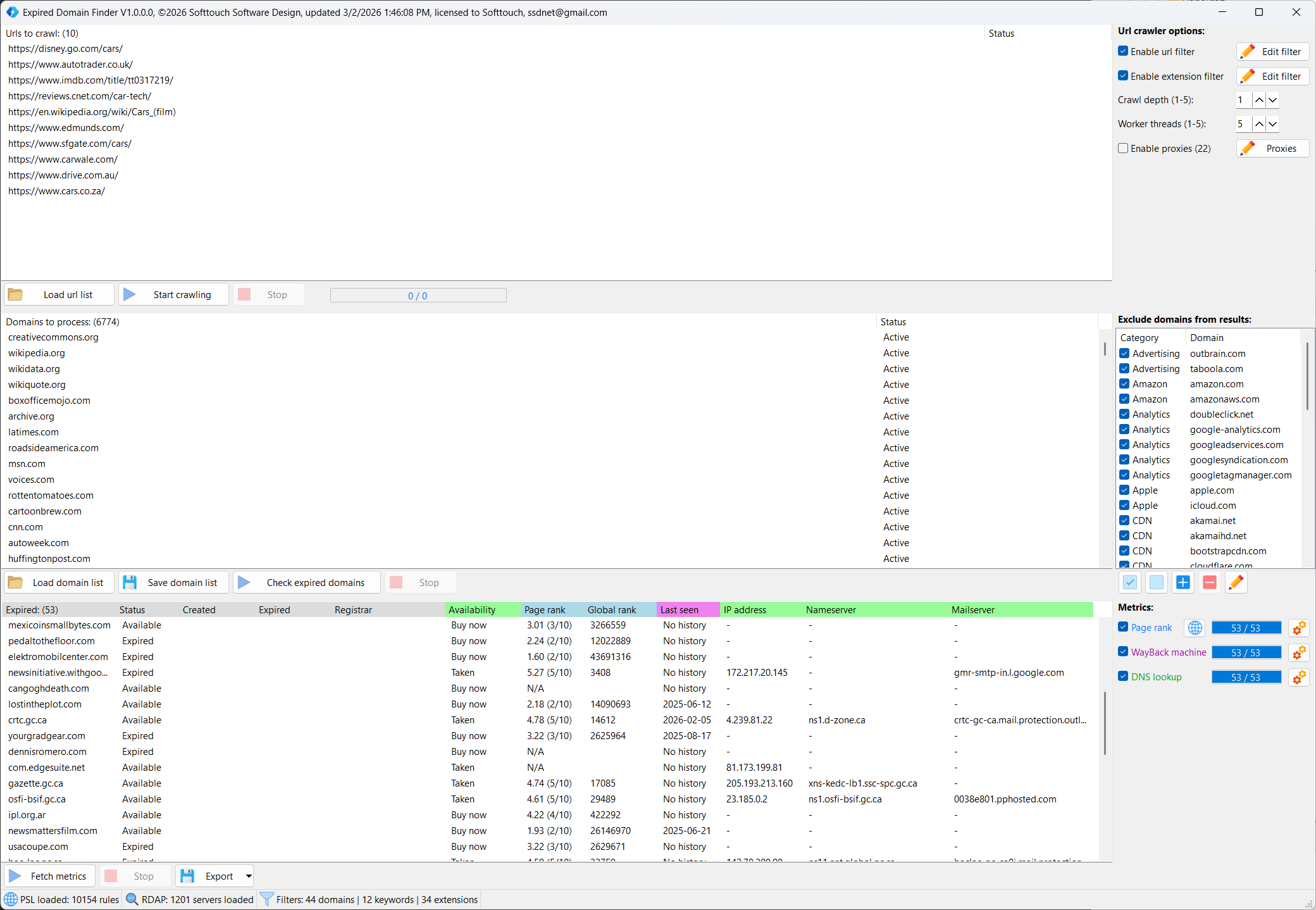
Expired Domain Finder — Find High-Value Expired Domains Before Anyone Else
Expired Domain Finder is a powerful desktop tool for SEO professionals, domain investors, and digital marketers who want to discover expired domains with real link equity and traffic history.
How it works
Point it at any list of URLs or let it crawl websites automatically. The built-in multi-threaded crawler extracts all external domains it finds, checks them against RDAP registries to identify expired and available domains, and presents the results with full metrics — all in one clean interface.
Comprehensive metrics for every domain
Every expired domain is automatically evaluated across multiple data sources so you can make informed buying decisions instantly:
- Page Rank — OpenPageRank score (0-10) showing the domain’s link authority
- Global Rank — Worldwide popularity ranking
- Last Seen — When the domain was last active, sourced from the Wayback Machine
- DNS Status — Real-time check confirming whether the domain is truly available to register right now
- RDAP Data — Creation date, expiration date and last registrar — proving the domain’s age and history
Smart filtering built in
Automatically filters out CDN domains, social networks, analytics platforms, hosted services like Blogspot and WordPress, and hundreds of other domains you will never want to buy. Fully customizable — add your own exclusions by category.
Buy instantly
When you find a domain worth buying, right-click and open it directly in GoDaddy, Namecheap, Name.com or Dynadot with a single click.
Built for speed
Multi-threaded architecture processes hundreds of domains simultaneously. Configurable crawl depth, worker threads, and request delays give you full control over speed vs. server load.
Key features:
- Multi-threaded web crawler with configurable depth and thread count
- RDAP-based expiry detection across 1200+ TLD registries
- Bulk domain list import and export
- OpenPageRank, Wayback Machine and DNS metrics
- Real-time availability confirmation via DNS lookup
- Smart domain exclusion filter with 60+ pre-configured domains
- URL and extension filtering to skip irrelevant links
- Proxy support for large-scale crawling
- Dark and light theme
- Export results to file
Extract: Right-click the .zip and select “Extract All”.
Bypass Windows SmartScreen: Double-click the .exe. When the blue screen appears, click “More info” at the top, then click “Run anyway” at the bottom.
Antivirus (AV) Warnings: Because Softtouch software is specialized and newly released, some antivirus programs may flag it as “Unknown” or “Suspicious.”
The Fix: If your AV blocks the file, go to your AV settings and select “Allow” or “Add to Exclusions.” > * Verification: Every file is 100% clean. You can verify this by uploading the file to VirusTotal.com before running it.
Register: Enter your Name, Email, and Transaction ID in the startup window to begin the 1-12h manual activation.
Need help? Contact Support
🛠️ How Activation Works
All Softtouch software follows a secure manual activation process.
- Initial Setup: When you launch a program for the first time, an activation window will appear.
- Submit Details: Enter your Name, Email, and Transaction ID (found in your purchase confirmation email).
- Manual Verification: Your details are sent to our team for verification.
- Confirmation: Once activated, you will receive an email from us. You can then restart the software and begin your work.
⏳ Please Note: Activation is handled manually and typically takes 1 to 12 hours depending on the timezone.